Getting Started
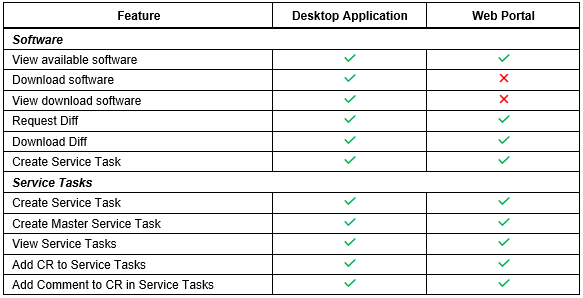
Qualcomm® Package Manager 3 can be used in two different ways:
-
Desktop application – A fully functional native application that can be used to find, download, install, and manage software, software requests, tools, and documents.
- This version must be used to manage software, tools, and documents that have been downloaded, installed, and licensed to the local system.
- All downloads, installations, and tool license activations must use the Desktop Application.
-
Web portal – Has the ability to view, request, and diff available software, create and view Software Requests, and view tools and documents.
Qualcomm® Package Manager 3 Desktop Application and Web Portal expose the same user interface, but have slightly different features.