Troubleshooting Linux or MacOS Clients
Please test these steps in order. If a step is completed successfully, please move to the next test.
Verify the client can resolve the API endpoint via DNS
- Open a terminal
- Type nslookup click Enter
- Type the API endpoint apigwx-aws.qualcomm.com click Enter
- You should see a response with a list or Ips similar to below.
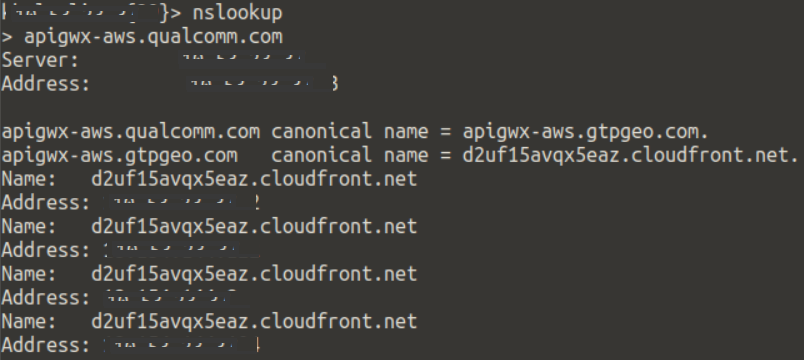
- If no IP’s are returned: Reach out to your company DNS team to troubleshoot why apigwx-aws.qualcomm.com is not resolvable from your client. There is any issue with your clients DNS.
Verify the client can reach the API endpoint via PING
- Open a terminal
- Type ping apigwx-aws.qualcomm.com
- Type Ctrl + C to stop the ping test after 5-10 seconds.
- You should see a response below with Packets Lost=0
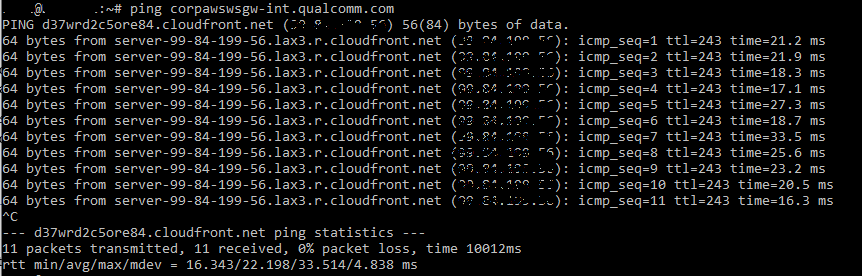
- If you are seeing packets lost or packets not received. Reach out to your companies networking team to troubleshoot why apigwx-aws.qualcomm.com is not working via Ping.
Verify the client can reach the API endpoint via telnet
- Open a terminal
- Type telnet apigwx-aws.qualcomm.com 443
- You should see *Connected to .cloudfront.net

- Type Control + C to close the connection
- If you are seeing connection failed or timed out. Please reach out to your network team to troubleshoot why apigwx-aws.qualcomm.com is not working via telnet from your client.