Offline Licensing and Installation
The Qualcomm tool software licensing framework requires communication with a licensing server to activate and deactivate licenses.
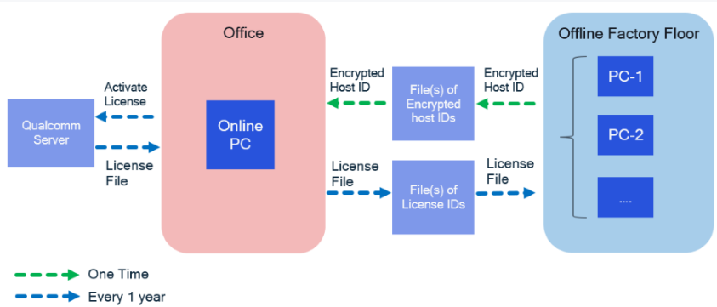
Offline support for factory users is provided by the Qualcomm® Package Manager 3 Command-line Interface, or qpm-cli. The offline/factory computer must generate a Host ID to uniquely identify it. The Host ID file only contains a string generated to uniquely identify the host. The online computer uses the Host ID file to activate license on behalf of the offline computer and receive responses from the Qualcomm licensing server. The offline/factory computer can process the responses from the online computer to enable licensing and further installation. The overall process is explained in the diagram below. This is currently supported on Windows and validated on Windows 10.
Requirements:
- At least one online host with access to the licensing server
- https://corpawswsgwx.qualcomm.com
- Special factory license type is required
- Contact ToolLicenseSupportRequest@qti.qualcomm.com for assistance.
- Shared network filer location with:
- Read/write access from the offline host(s).
- Read/write access from the online host.
Offline Licensing and Installation Process :
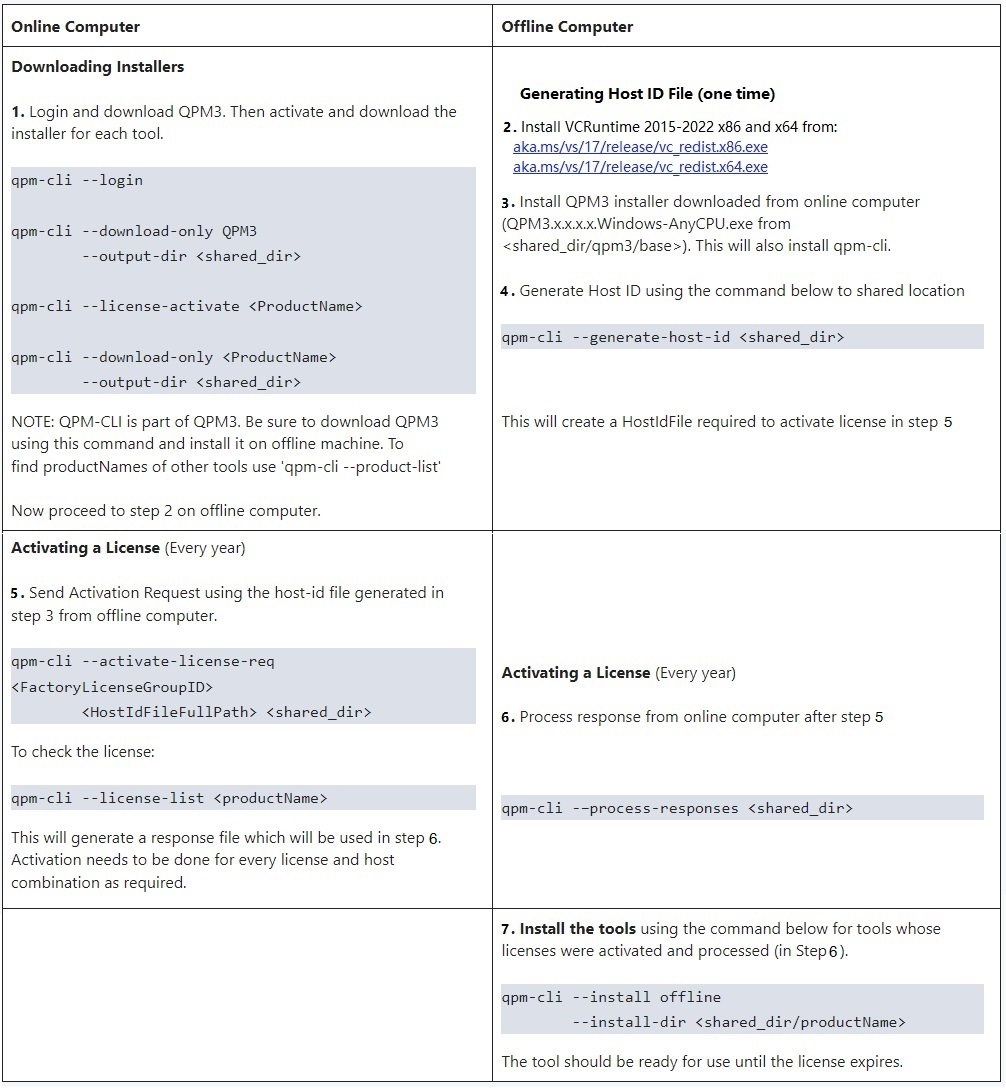
Online computer should have QPM3 installed from qpm.qualcomm.com. Installation process, instructions and help can be found in the Help section of the QPM Website.
Alternative way to download installers :
| Online Computer | Offline Computer |
|---|---|
| 1. Identify the licenses that are necessary for your Product/Bundle. | No change in the process for offline computer. |
2. Execute command : qpm-cli --activate-offline-download <product name/path to bundle> --licenseids <licenseIds separated by comma> --output-dir <output directory> | Note : If you identify any add-on missing that you need, it might not be included in the provided licenses on the online computer. |
Commands:
| Commands | Arguments | Description |
|---|---|---|
| --download-only | <ProductName> --output-dir <shared_dir> | Downloading Installers in online computer |
| --generate-host-id | <shared_dir> | Generating Host ID file (One time) in offlinecomputer, This will create a HostIdFile required to activate license. |
| --activate-license-req | <FactoryLicenseGroupID> <HostIdFileFullPath> <shared_dir> | Activating a License, Send Activation Request using the host-id file generated from offline computer. |
| --process-responses | <shared_dir> | Process response from online computer |
| --install offline --install-dir | <shared_dir/productName> | Install the tools in offline computer |
| --deactivate-license-req | <ActivationID hostIdFIle outputLocation> | Deactivate existing license on offline host |